




Keep customers updated. Without promising an exact arrival time.

Your routes change. The weather changes. Hoptide helps customers follow along with service updates by text, email, and their own private page, without you answering the same questions all day.

Try Hoptide with one customer for free.

Snow removal

Does your phone keep ringing while you're working?

  • "Are you coming today?"
  • "How much longer?"
  • "Did you already clear my driveway?"

You've probably answered these questions more times than you can count.

Your customers aren't wrong for asking. They just want to know when to expect you.

But you can't spend your whole day answering the phone.

Give them a way to check without calling you.

Snow doesn't follow a schedule. Your updates don't have to either.

A truck gets stuck. A storm gets worse. A commercial job takes longer than expected.

You can't always tell customers exactly when you'll arrive.

With Hoptide, you don't have to.

Start your route, update stops as you work, and let customers see the progress. If plans change, keep everyone affected in the loop without texting each person individually.

No guessing arrival times. No promises you can't keep.

What Hoptide does

Your customers can check for themselves.

Every customer gets a private page where they can see the latest information about their service.

When you're coming
Let customers see when they're scheduled and how many stops are ahead of them.
When plans change
Running late or moving a visit? Let affected customers know.
When you're finished
Customers can see when their property was serviced and check previous visits.

They don't need to download an app or create an account.

9:41
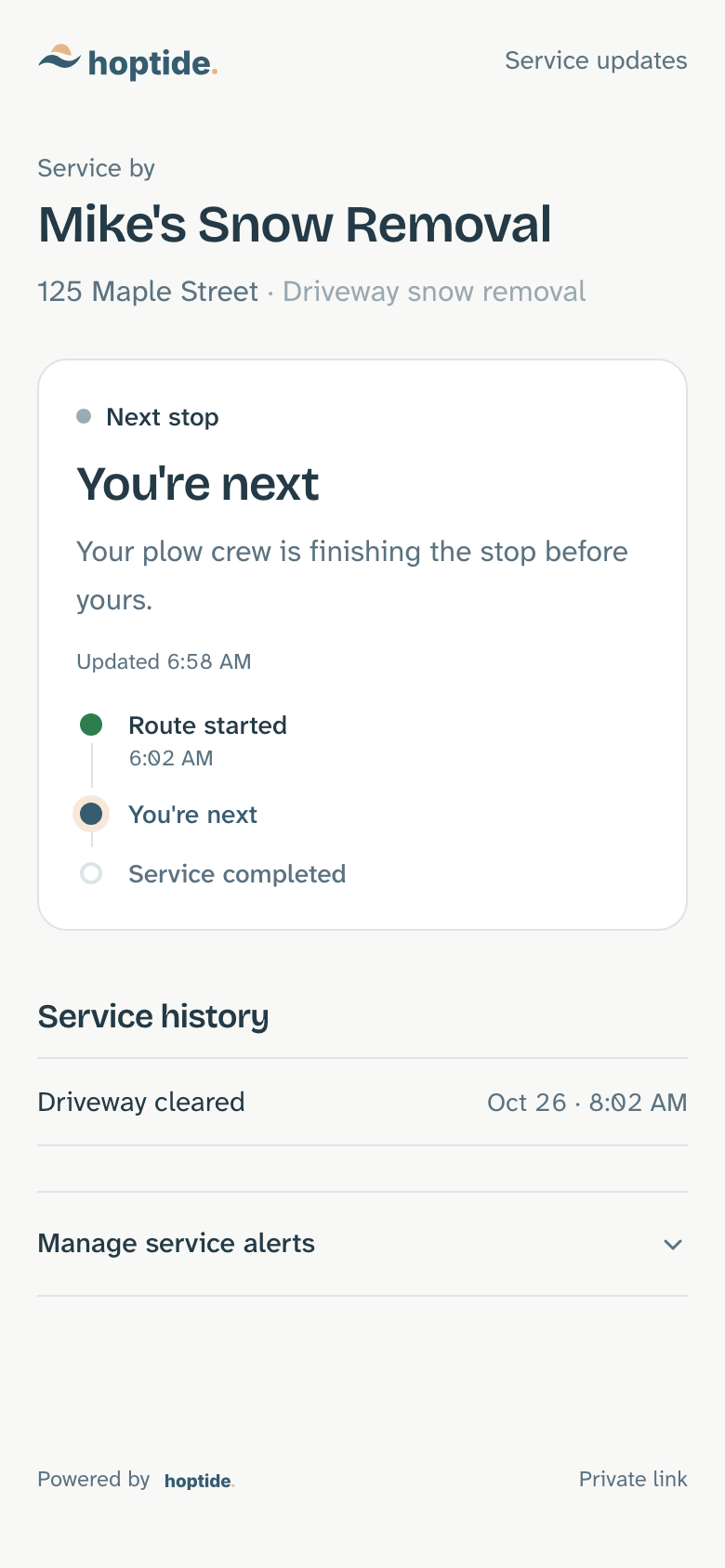
A customer's page: Mike's Snow Removal, 125 Maple Street, You're next, with route steps and service history.
How it works

You run your route. Hoptide handles the updates.

  1. 1

    Add your customers

    Upload the list you already have, or add customers individually. Need help? We'll set it up for you.

  2. 2

    Start your route

    Put your stops in order and start when your crew is ready.

  3. 3

    Mark jobs complete

    As you finish each stop, Hoptide updates the next customers on your route.

With text alerts enabled, customers can also receive messages when they're next or when the work is done.

One storm morning, start to finish.

Mike runs 20 driveways with one truck. This is everything he does in Hoptide during a storm, and what his customers see while he does it.

  1. 5:40 PM · The night before

    Build the route once

    Mike ticks the 20 customers, puts them in street order and publishes. Next storm he reuses it.

    Step 1
  2. 6:02 AM · First light

    Tap Start

    Every customer page switches to its own stop number, like "Stop 7 of 20 today". Nobody has to be told the plow is coming.

    Step 2
  3. 6:41 AM · Stop 3 done

    Mark complete

    One tap. Sarah's page reads "Your driveway has been cleared". Lena, next door, sees "You're next".

    Step 3
  4. 6:58 AM · Stop 4 done

    Mike's customers get updated automatically

    Lena gets one message with the time. If Mike hits a delay, one tap tells everyone still waiting.

    Step 4

While Mike drives, the AI in Hoptide answers for him.

  • Hoptide with Answers

    Questions are answered from the route

    Sarah asks "Am I next?" on her page. Hoptide answers from her own service record, and passes anything it can't answer to Mike.

Customer experience

Here's what your customer sees.

Customers can open the same private link whenever they want to check their service or past visits.

Mike's Snow Removal

Next stop

Your driveway is next.

The crew is finishing the previous stop.

Later

Mike's Snow Removal

Completed

Your driveway has been cleared.

Completed at 6:58 AM.

Real customer questions

What do your customers keep asking?

Choose a problem to see how Hoptide can help.

How Hoptide helps

Let customers see when they're next.

Start your route and update stops as you go. Each customer can check their own status without calling you.

Example customer update

You're next. We're just finishing the stop before yours.

9:41
A customer's page: Mike's Snow Removal, 125 Maple Street, You're next.
Getting started

Already have a customer list?

You don't need to type everything into another system.

Upload your spreadsheet, or send it to us and we'll help you get your customers and first route set up.

hoptide.co/your-business/customers
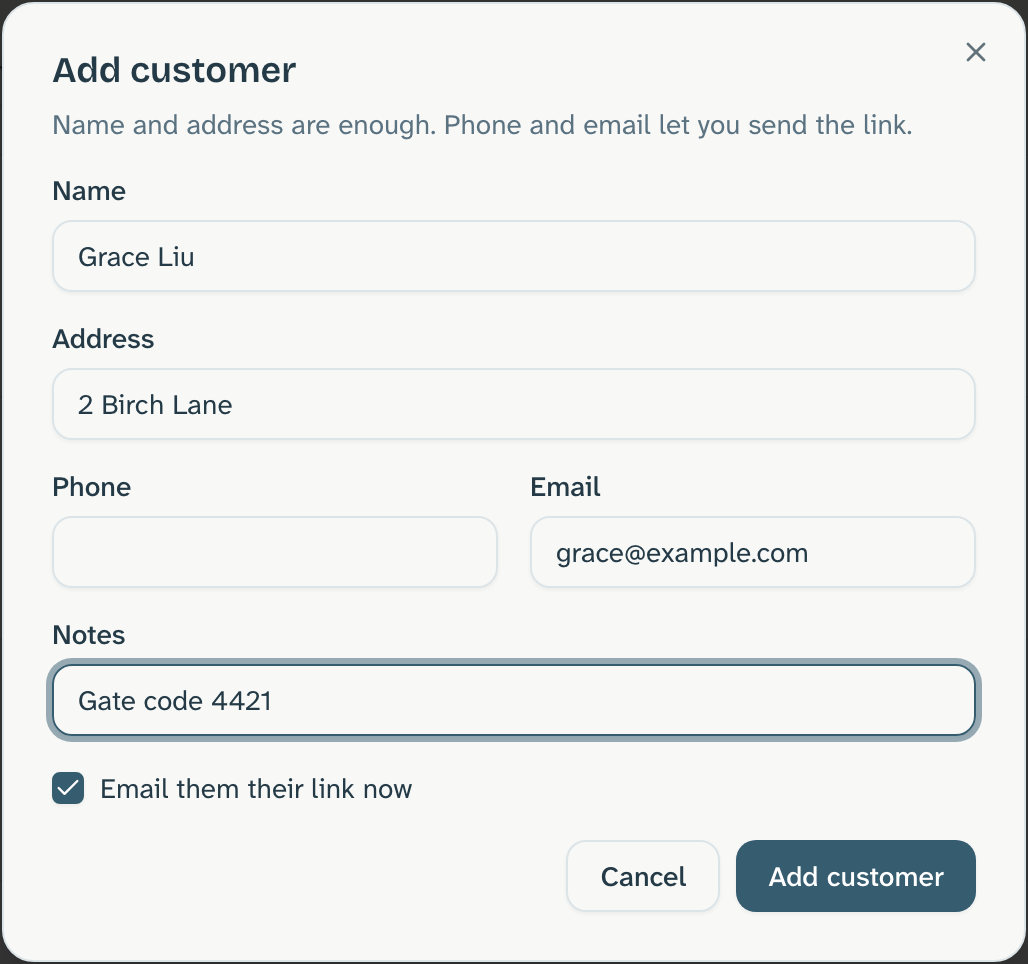
The Add customer dialog: name, address, phone, email, notes, and a ticked box to email them their link now.
We'll set it up

Get help setting up.

Tell us how you keep your customers today. We'll help you import them and prepare your first route.

For example: a Google Sheet with about 40 driveways. Please don't paste your customers' details here. When we reply, we'll tell you how to send your list safely.

Pricing

Try it with one customer for free.

One price for the whole business. No charge per customer or per crew member.

Hoptide

Updates for every customer

Update your customers automatically.

$40/month

Billed monthly

Choose Hoptide
  • All your customers, typed in or imported
  • Routes and appointments
  • Email and text updates
  • 500 texts a month*
  • The drive screen for your crew
  • Customer messages in one inbox
  • Calls to your toll-free number ring your phone, 100 minutes a month

Hoptide with Answers

Recommended

Customers get answers without calling you.

$70/month

Billed monthly

Choose Answers
  • Everything in Hoptide
  • 1,000 texts a month*
  • 300 AI answers a month*
  • Answers from each customer's own service records
  • Your saved answers to common questions
  • Hands the question to you when it needs a person
  • Question history

Free

No card needed

Try it with one real customer.

$0forever

Start free
  • Use Hoptide with one customer
  • Email updates only, no texts
  • Your whole crew can sign in

* Need more on a paid plan? Add 500 texts for $15 or 100 AI answers for $10 at any time from your Plan page.

Compare plans side by side

Questions?

Whether you are just looking or already running routes and appointments, these are the questions owners ask us most.

Not at all. Hoptide lets customers see their service status and how many stops are ahead of them. You can also notify them when plans change, without promising a specific arrival time.

No. They open a private link on their phone or computer.

Yes. Customers get email updates by default and can turn on texts on their own page by confirming their number. Nobody is texted without agreeing first. You choose which service updates go out.

Yes. Hoptide handles service updates and tracking. You can keep using your existing payment tools.

Yes. If you already have a customer list, we'll help you import it and prepare your first route or your first appointments.

Yes. A service runs either as a route or as appointments. On a route, customers see their stop number and how many stops are ahead of them. For an appointment, they see the arrival window, then when your team is on the way, has arrived, and is done.

No. On a route they'll see their service status and how many stops are ahead of them. For an appointment they'll see when your team is on the way. Both come from updates your crew makes, not from a map.

Still have questions?

Send us a message and a person replies.

Contact us

Ready to spend less time answering calls?

Try Hoptide with your first customer and see how it works.